
Pet profile
A profile holds photos, species, breed, age, size and health notes.
Pet matching
Cat, dog and other pet owners create a profile and intent, filter nearby matches, plan an agreed walk and share a lost-pet notice in the neighborhood.
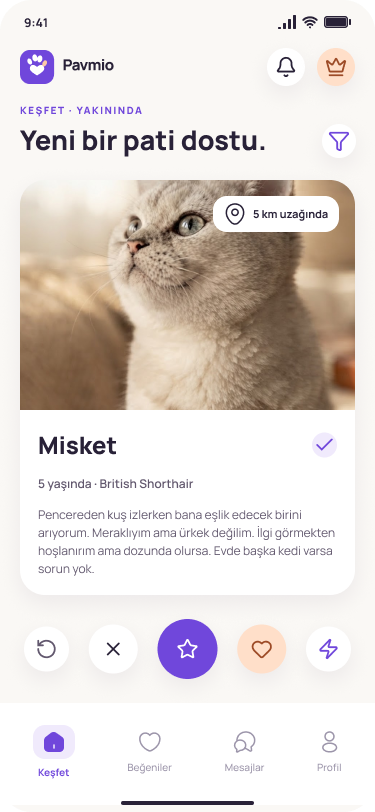
These points match flows that exist in the mobile app.
A profile holds photos, species, breed, age, size and health notes.
Profiles are browsed with like and pass. A mutual like creates a match.
Nearby pets can be ordered from the shared location.
Existing filters such as species, age, size and distance are used.
Chat opens after a match exists.
A person can be blocked and inappropriate behaviour can be reported.
Two matched people pick a park, time and duration. Both check in on arrival and rate each other after the walk. The free plan includes one walk a month; VIP has unlimited walks and priority at nearby free parks.
The profile states a purpose: playmate, breeding or adoption. Breeding chat stays closed until vaccine and chip documents are approved. Document review is a one-time fee. VIP can filter to verified profiles only.
A lost pet appears as a map notice to nearby users. Free notices are limited; a featured notice is paid. Veterinary clinics and pet shops also appear on the map.
Six steps, based on the current app flow.
Download when the store link is live.
Finish your account, basic details and intent: playmate, breeding or adoption.
Open a profile with species, age, size and photos. Breeding needs approved vaccine and chip documents.
Browse suitable profiles with location and filters.
Pick a park, time and duration. Both check in on arrival and rate each other afterwards.
Nearby people see a map notice. Featured notices are paid.
Real screens from the app. Order and visibility can be changed in the admin panel.
A match based on the pet profile and the owner’s preferences.
Profile, discovery and chat sit in one flow.
Species, breed, age, size, colour and vaccine status can be stored.
The list narrows by distance and pet traits.
People can be blocked and reported inside the app.
Chat opens with a mutual match.
A walk has a park, time, check-in and a rating, so the chat does not stall halfway.
People do not match on the wrong expectation. Breeding chat stays closed until documents are approved.
A lost-pet notice turns the app into a neighborhood network that people keep.
No. The site introduces the app. Accounts, matches and chat live in the mobile app.
The app includes cat, dog, bird, fish, hamster, rabbit and other.
In the app, open Profile and the delete-account step. A password and confirmation are required. The website form is for records held by this site.
Only reviews approved by an admin and not marked as samples are shown. The sample review is not public.
The button stays on Soon until an official address is saved. No address is invented.
Two matched people pick a park, time and duration and confirm the walk. Both check in on arrival and rate each other afterwards. The free plan includes one walk a month. VIP has unlimited walks and priority at nearby free parks.
The profile states a purpose: playmate, breeding or adoption. Breeding chat stays closed until vaccine and chip documents are approved. Document review is a one-time fee. VIP can filter to verified profiles only.
A lost pet appears as a map notice to nearby users. The free plan has a limited active notice; a featured notice is paid. Veterinary clinics and pet shops also appear on the map.
Sample content. This is not a real user review or a verified case.
This article is a sample draft. It does not replace veterinary advice.
Sample content. This is not a real user review or a verified case.
A match is not a guarantee. The animal’s wellbeing comes first.
Sample content. This is not a real user review or a verified case.
Vaccine and chip details can live on a profile. This page does not diagnose.
Buttons stay on Soon until a store link is set.
Necessary cookies keep the site working. Analytics and marketing cookies stay off unless you allow them.